



Construction Cybersecurity: How to Protect Project Files

This guide gives construction companies a practical plan to protect bids, drawings, contracts, schedules, and payment systems. You will find the controls to set up first, how to separate jobsite networks, how to verify payment changes, and what to do if ransomware is suspected.
KairosIT supports construction teams with managed IT and cybersecurity, and many of the steps below are work an IT provider would normally handle with you.
Key takeaways
- Turn on multifactor authentication (MFA) for email, cloud storage, project platforms, and remote access.
- Give each person access only to the files their role needs, and remove access when a project or job ends.
- Keep company devices, guest Wi-Fi, subcontractor connections, and cameras on separate networks where practical.
- Verify every change to vendor bank details by calling a number you already have on file.
- Keep a separate, protected backup of critical files and test the restore.
- Write down who to call and what to isolate before an incident happens.
What ransomware can interrupt on a construction company
Construction teams work from shared information. Each system below supports a daily task and can go offline in a ransomware event:
|
System |
What it supports |
What an outage interrupts |
|
Plan and BIM storage |
Current drawings and models |
Field work and approvals |
|
Estimating and bid files |
Pricing, takeoffs, bid packages |
Bid deadlines |
|
Contracts and change orders |
Scope and cost changes |
Billing and approvals |
|
Scheduling tools |
Crew and trade coordination |
Sequencing |
|
Accounting systems |
Payroll, vendor and subcontractor payments |
Cash flow |
In an Egnyte customer study reported by ENR in 2022, 28% of logged ransomware attacks were in architecture, engineering, and construction, about twice the average for other industries. The study covers Egnyte's customers, so it describes that group and not every firm.
How to protect project files and bids
Turn on MFA
MFA adds a second check beyond a password, so a stolen password alone does not open an account. CISA's #StopRansomware Guide says to implement phishing-resistant MFA for all services, particularly email, VPNs, and accounts that access critical systems. Start with email and remote access, then add project platforms and cloud storage.
Use controlled sharing
Share plans and bids through approved platforms with individual accounts. In Microsoft 365, set SharePoint and OneDrive links to specific people rather than anyone with the link, and set expiration dates where available. Keep the current approved drawing set in one clearly labeled location so the field team does not depend on email attachments.
Limit access to what each role needs
Estimators may need pricing and margin files. A trade partner may only need approved drawings for its scope. Review permissions when project roles change.
Remove access when work ends
Remove subcontractor and employee access to email, shared drives, and project platforms when a job closes or a person leaves. Our guide to Microsoft 365 security hardening covers guest access, sharing reviews, and Conditional Access in more detail.
Keep devices updated
Apply security updates to laptops, tablets, servers, and construction software. CISA's guide recommends regularly patching and updating software and operating systems. Use endpoint security tools, screen locks, and unique accounts on every device, including tablets that move between the office and jobsites.
How to secure jobsite networks and connected devices
Separate company, guest, and device networks
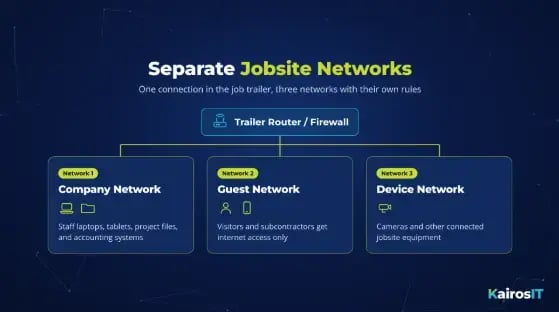
A job trailer should give visitors and subcontractors a guest connection that is separate from the company network. Put internet-connected cameras and other equipment on their own network too. On most business routers and firewalls, this means creating separate networks (SSIDs or VLANs) with their own rules. This limits how far an infection can spread if one device is compromised.
Review remote access
CISA's guide advises not exposing services such as remote desktop protocol (RDP) to the internet and limiting remote desktop exposure where possible. Ask your IT provider to list every remote access path into your office and trailers. Change default router and device passwords, and install firmware updates.
Protect phones, laptops, and tablets on site
Require passcodes and know how to report a lost device right away. Use company-managed devices that can be locked or wiped remotely where appropriate. Keep unknown personal devices off the main company network.
How to prevent invoice fraud and phishing
Verify every change to payment details
Construction runs on invoices, pay applications, and subcontractor payments, so attackers copy those messages. Before changing a vendor's bank account, call a phone number you verified earlier, not the number in the email. Add a second approver for payments above a set amount. Our post on vendor email compromise explains how fake supplier messages request new payment details.
Train for construction-specific messages
Short training works best when it uses real project examples. Show staff a fake "revised bid package" that leads to a sign-in page, an unexpected invoice attachment, and a message from a subcontractor account asking for new banking details. Give employees one place to report anything unusual.
How to back up construction data
Decide what to back up
Back up the files that keep projects moving. These include current drawings and models, estimates, contracts, schedules, change orders, and financial records.
Keep a separate protected copy
File sync tools copy changes to every connected device, including changes made by ransomware. A separate backup keeps earlier versions that a compromised account cannot easily change. CISA's guide advises that you maintain offline, encrypted backups of critical data and test them regularly.
Test the restore
Ask your IT provider to show you how the latest approved plans and accounting data would be restored. Our post on why backup alone needs a recovery plan covers restore testing and recovery priorities.
How to manage subcontractor and vendor access
Every subcontractor, supplier, and software provider with access to your systems is part of your security picture. List who can reach which files, and give each one only what it needs. Our guide to third-party cyber risk explains how to map vendor access and add security terms to contracts.
What to do if you suspect ransomware
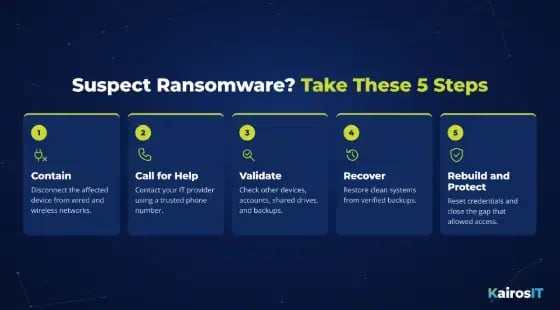
Write your incident plan before you need it. Use these steps as a framework:
- Contain. Disconnect the affected device from wired and wireless networks. Do not investigate or reconnect it yourself.
- Call for help. Contact your IT or cybersecurity provider using a trusted phone number, not email from an affected account.
- Validate. Check other devices, accounts, shared drives, and backups before restoring anything.
- Recover. Restore clean systems from verified backups once the threat is contained. Confirm teams are working from the latest approved drawings.
- Rebuild and protect. Reset credentials and close the gap that allowed access.
Review contract and notification obligations with your legal advisers. CISA's guide also says to consult federal law enforcement about possible decryptors, even when mitigation is possible.
How KairosIT supports construction companies
Our construction IT services are built for job sites, remote teams, and fast-paced project timelines, and include 24/7 monitoring, managed backups, help desk, and network support. Backups are managed and monitored so they are ready to restore.
What would a construction cybersecurity review cover at your company? Ask KairosIT
A review shows how your bids, drawings, contracts, and payment systems are protected today and where the gaps are. The KairosIT Compliance Readiness Assessment is a structured evaluation of your security posture, backup integrity, and documentation gaps, with a written findings report you can act on whether or not you work with us.
Book Your Compliance Readiness Assessment or learn more about our cybersecurity services.