



Cybersecurity for Law Firms: 7 Essential Controls

This guide shows how a law firm can protect client data, privileged communications, and settlement funds. You will also see which security controls to put in place first. It translates cybersecurity into concerns attorneys already manage, including confidentiality, trust-account payments, remote work, and the use of AI tools.
KairosIT is a managed IT and cybersecurity provider in Pompano Beach, Florida, that supports legal services firms. The sections below start with what ethics rules expect and end with a checklist you can use this week.
Key Takeaways
- Law firms have a professional duty to make reasonable efforts to protect confidential client information, and the exact rules depend on the jurisdiction.
- Start with multifactor authentication (MFA), matter-level access, encrypted devices, tested backups, and secure document sharing.
- Confirm any change to payment instructions by calling a phone number you already verified.
- A breach does not automatically waive attorney-client privilege, though it can create serious confidentiality issues.
- Approve AI tools before staff use them, and set rules for what client material can be entered.
- Review cloud software and outside IT vendors the same way you review your own systems.
Why Do Law Firms Face Different Cybersecurity Risks?
A law firm holds three things attackers value. Client files contain personal and financial details. Email and documents carry privileged advice. Trust accounts move large payments on short deadlines.
The ABA's 2023 Legal Technology Survey found that 29% of respondents said their firm had experienced a security breach, up from 27% in 2022. Another 19% did not know whether a breach had happened.
What Do ABA Rules Say About Law Firm Cybersecurity?
In the United States, cybersecurity connects to attorneys' ethical duties. ABA Model Rule 1.1 calls for competence, including awareness of technology risks. Model Rule 1.6(c) asks lawyers to make reasonable efforts to prevent unauthorized access to or disclosure of client information.
Model Rule 5.1 covers supervision of other lawyers. Model Rule 5.3 covers staff and outside service providers. These are model rules, so the rules your state has adopted govern your firm. Reasonable safeguards depend on how sensitive the information is, the likely threats, and your circumstances.
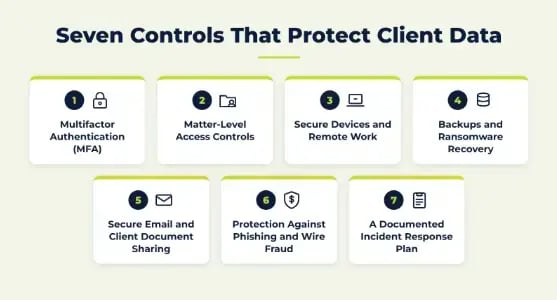
Seven Controls That Protect Client Data
These seven controls cover the everyday risks most law firms manage.
1. Multifactor Authentication (MFA)
MFA asks for a second proof of identity at sign-in, so a stolen password alone is not enough. Turn it on for firm email, Microsoft 365 or Google Workspace, practice management, document storage, and remote access. Authenticator apps or security keys are stronger than text-message codes when available.
In the same ABA survey, 54% of attorneys said two-factor authentication was available to them. The survey asked about availability, so confirm it is switched on for every account.
Our guide to hardening Microsoft 365 shows how to review MFA coverage.
2. Matter-Level Access Controls
Give each person a separate account, with permissions limited to the clients and cases they work on. This also supports situations where a conflict requires keeping a team away from a matter.
Review access when roles change and disable accounts the day someone leaves.
3. Secure Devices and Remote Work
Encryption helps protect client files if a laptop is lost or stolen. Encrypt laptops and phones. Require screen locks and keep software updated. Use managed endpoint protection that covers home offices and travel devices.
Remote access should let attorneys reach matter files from court, home, or a client site without copying files to personal devices. KairosIT's legal services page lists secure access to documents and systems from anywhere as part of its offering.
4. Backups and Ransomware Recovery
Ransomware can lock case files, calendars, and billing records. Keep backups separate from daily systems, with one isolated copy. Test restoring files on a schedule.
Backups also need a written recovery plan that sets which systems come back first.
5. Secure Email and Client Document Sharing
A wrong recipient or an overly broad sharing link can expose a confidential document. For sensitive records, use an authenticated client portal or encrypted sharing with controlled permissions.
The ABA survey found email encryption available to 42% of respondents. Routine attorney-client email does not automatically require special encryption. The right protection depends on the information, the recipient, and the risk.
6. Protection Against Phishing and Wire Fraud
Attackers may break into a real mailbox or impersonate a sender to change settlement or closing instructions. The FBI's 2025 Internet Crime Report lists business email compromise at about $3.05 billion in reported losses across 24,768 complaints.
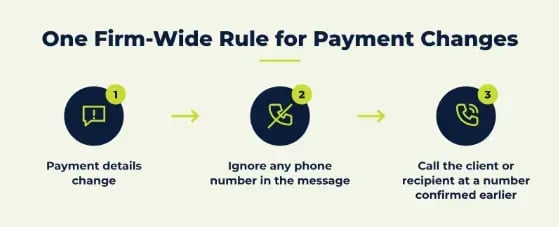
Set one firm-wide rule. If payment details change, call the client or recipient at a number confirmed earlier, never one from the suspicious message.
Train staff to pause and verify any unusual payment or login request.
7. A Documented Incident Response Plan
Write down who leads the response if a mailbox is compromised or files are taken. List who to call for technical and legal help, along with the steps to contain the incident. Include how you will determine what data was affected and how you will assess notification duties.
Run through the plan with your team on a schedule so each person knows their role.
Can a Data Breach Affect Attorney-Client Privilege?
A breach does not automatically waive privilege. The duty of confidentiality covers information relating to a representation. Attorney-client privilege is a narrower protection for qualifying confidential communications about legal advice.
An unauthorized disclosure can still create serious issues. The outcome depends on the facts and applicable law. Maintain reasonable safeguards, investigate suspected exposure promptly, and get legal advice about next steps.
How Should Law Firms Handle AI Tools and Work Product?
Attorney work product is material a lawyer prepares for a case, such as strategy notes and draft arguments. Pasting that material into a public AI tool can place it outside firm control. What the tool retains depends on its terms.
KairosIT's post on shadow AI cites research reporting that 38% of employees share confidential data with AI platforms without approval.
ABA Formal Opinion 512 explains how duties such as confidentiality and competence apply to generative AI tools.
Approve Tools Before Staff Use Them
Choose the AI tools the firm allows and make that list easy to find. Name who approves new tools and how staff can request one.
Set Rules for What Can Be Entered
Write down which client material may never go into an AI tool. Put the rule in the same place as your confidentiality policy.
Fix Permissions Before Adopting Copilot
Microsoft 365 Copilot follows existing permissions, so old sharing mistakes can surface in its answers. Our Copilot safety guide for law firms walks through the cleanup to finish first.
What Should Firms Ask Cloud and IT Vendors?
On a cloud platform, the firm usually sets its own access and sharing permissions. Before adopting practice management software, file sharing, or an AI tool, ask:
- Who can access our client information?
- How long is it kept?
- What happens after an incident?
- Which security settings are our responsibility?
Apply the same questions to outside IT providers. Our article on third-party cyber risk explains why vendor security reaches your clients.
Cybersecurity Checklist for Small and Midsize Law Firms
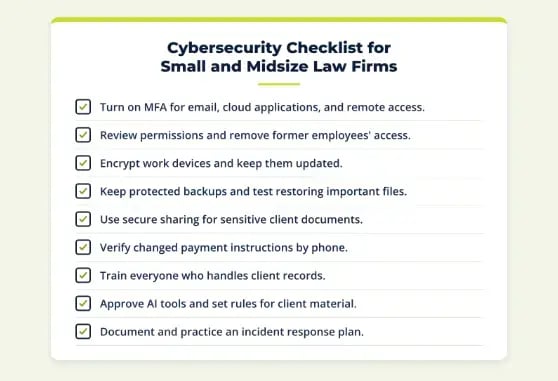
Use this self-assessment to find the highest-risk gaps first:
- Turn on MFA for email, cloud applications, and remote access.
- Review permissions and remove former employees' access.
- Encrypt work devices and keep them updated.
- Keep protected backups and test restoring important files.
- Use secure sharing for sensitive client documents.
- Verify changed payment instructions by phone.
- Train everyone who handles client records.
- Approve AI tools and set rules for client material.
- Document and practice an incident response plan.
A small firm can work through the list in order. Assign an owner to each open item.
How KairosIT Supports Law Firms
KairosIT's legal services IT page lists fully managed or co-managed IT, cybersecurity, managed cloud, Microsoft 365, managed backups, and disaster recovery.
Its cybersecurity services include 24/7 managed detection and response. Other services include cybersecurity training with phishing simulations, as well as vulnerability scanning.
Where Should Your Firm Start With Cybersecurity? Ask KairosIT
Start with the controls that protect accounts, payments, and your most sensitive files. Then work through the checklist above one item at a time.
If you want help ranking the gaps, schedule time with KairosIT or request a free IT Compass Scan, a short session that helps leadership see where the firm's IT stands.